Remote Computer Repair
Get Your PC Fixed Online — No Need to Unplug a Thing
A lot of the problems I get called out for don't actually need your computer to leave your desk. If your PC is slow, buried in pop-ups, refusing to update, or just not acting right, I can very often fix it remotely — I connect to your computer over a secure link, you watch the whole time, and I sort it out while you sit there with a coffee. Faster for you, cheaper than a house call, and you never touch a cable.
How Remote Repair Works
You call or email
Tell me what's going on. If it's something I can handle remotely, we book a time — often the same day.
Download RustDesk
Go to rustdesk.com, save the free RustDesk file to your Desktop and double-click it. Full steps with a picture are just below.
I fix it, you watch
You see everything I do on your screen the whole time. When we're done, the connection closes and I can't get back in.
Downloading RustDesk — What to Do
RustDesk is the free program I use to connect. There's nothing to install — you just save one small file and run it. Here's how:
- Open your web browser and go to rustdesk.com/download.
- Find the Windows column and click EXE on the top row (the one marked x86-64 (64-bit)) — it's circled in red in the picture below.
- When your browser asks, choose Save, and save the file to your Desktop so it's easy to find.
- Double-click the file on your Desktop to open RustDesk.
- Read me the ID number and Password it shows on screen. That's the hard part done — I'll take it from there.
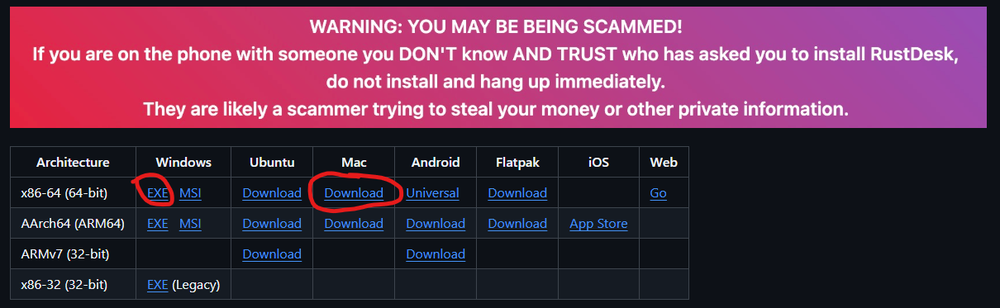
On the RustDesk download page, click EXE in the Windows column, top row. On a Mac? Click Download in the Mac column instead.
You'll see a big red "You may be being scammed" warning — and that's a good thing. RustDesk shows it to everyone, because scammers really do talk people into installing remote software. The rule is simple: only ever connect with someone you called yourself and trust. You phoned me, at the number that's been on this site for years — so you're doing exactly the right thing. If you ever get a surprise call from someone you didn't ring, just hang up.
Once RustDesk opens, you'll see your ID and Password down the left-hand side, under "Your Desktop." Read me both, and you're all set:
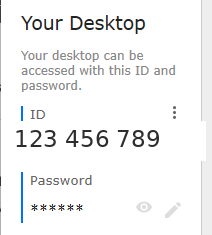
Your ID and Password appear here when RustDesk opens. (The number shown is just an example — yours will be different.)
What I Can Fix Remotely
Most of the everyday stuff that makes a computer miserable to use:
- Slow computer cleanups — clearing out the junk, startup clutter and leftovers that bog things down
- Virus, spyware and pop-up removal — cleaning up infections and browser hijacks
- Windows updates that won't install — the ones stuck at "downloading" for three weeks
- Email setup and send/receive errors — Outlook, Gmail, Telus and Shaw
- Software installs and settings — getting programs installed, updated or configured properly
- Printer and device driver problems — when Windows suddenly forgets how to talk to your printer
- General tune-ups — a top-to-bottom once-over to get an aging machine running its best
- "Show me how" sessions — I walk you through something on your own screen so you actually learn it
What Still Needs an In-Person Visit
I'll always be straight with you — some things just can't be done down a wire:
- Anything hardware: failing hard drives, dead power supplies, broken screens, upgrades
- A computer that won't boot or won't get online at all (no connection, no remote)
- Serious data recovery from a drive that's physically failing
If it turns out your problem needs hands-on work, there's no charge for the remote look — and if you're in the area, we just book a local repair instead.
🛡️ Keep It Clean After I've Gone
Once I've cleaned up a machine remotely, the next question is always: "How do I stop this from happening again?" The tool I install and run myself is Malwarebytes. It catches the modern stuff — ransomware, malicious websites, and the sneaky malware that slips right past the basic antivirus that came with your computer — and it runs quietly in the background without bogging your system down.
The free version is great for cleaning up an active infection. The paid plans, Standard and Plus, block threats before they land, so you're protected instead of just cleaning up afterward (Plus adds a VPN for extra privacy). I'm a Malwarebytes partner, so if it's a good fit for you, you can check the current pricing right here:
Simple, Honest Pricing
| Quick fix / short session One specific problem — an update stuck, email won't send, a setting to change (up to ~30 min) |
$40 |
| Cleanup & tune-up Full slow-computer cleanup, junk removal and once-over |
$70 |
| Virus & malware removal Infection and pop-up cleanup, browser repair, prevention setup |
$80 |
No fix, no fee. If I connect and can't help you remotely, you don't pay for the session — simple as that.
Is It Safe to Let Someone In Remotely?
Good question — and you should ask it, because scammers use fake "remote support" calls all the time. Here's the difference: you call me, at the number that's been on this site for years. I will never phone you out of the blue claiming your computer has a virus — that's always a scam, no exceptions.
During a real session you see everything on your screen, you can end it any second, and once we hang up the connection is closed and can't be reopened without you starting it again. If you're ever unsure whether a call is really me, hang up and dial 250-740-1812 yourself.
My Warranty
The work I do in a remote session is covered the same as any other job. If something I fixed isn't working right afterward, we get back on and I put it right — no charge for the labour. I can't control what Microsoft or your provider changes down the road, but the work I did? That's guaranteed.
Ready to Get Your Computer Sorted?
Call or email and tell me what it's doing. If I can fix it remotely, we'll often have it done today.
Call Big Mike TODAY
250-740-1812
Why Choose Big Mike?
- Experience: Over 30 years fixing computer issues for people
- You're in control: You watch every step and can end the session anytime
- Honest: No surprise charges, and no fee if I can't help remotely
- Convenient: No packing up your computer, no waiting for a drop-off
- Guaranteed: My work is covered by the same warranty as any in-shop job